Applied CATIA V.5 R15

Providing step-by-step instruction with numerous illustrations, this book offers a self-guided learning experience for users to learn CATIA V.5 R15 on their own with little or no outside help.
 TABLE OF CONTENTS
 Objectives:
Create a simple sketch using the Sketcher Workbench
Dimension a sketch using the Constraint command
Create a Shaft in the Part Design Workbench
Create a Pocket in the Part Design Workbench
Create a series of holes in the Part Design Workbench using the Circular Pattern command
Chapter 2 includes instruction on how to design the part shown below.
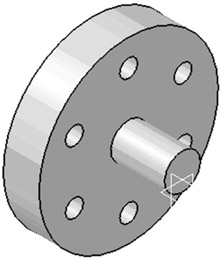
Start CATIA V5 by referring to "Chapter 1 Getting Started".
After CATIA is running, begin a new sketch.
Move the cursor to the middle right portion of the screen and left click on the Profile icon as shown in Figure 1.
Move the cursor somewhere in the lower left portion of the screen and left click once. This will be the beginning end point of a line as shown in Figure 2.
Move the cursor to the right and left click once as shown in Figure 2.
Move the cursor up and left click once as shown in Figure 3.
Move the cursor to the right and left click once as shown in Figure 4.
Move the cursor up and left click once as shown in Figure 5.
Move the cursor to the left and left click once. Ensure that both endpoints line up as shown in Figure 6.
Move the cursor back to the original starting end point and left click once as shown in Figure 7. Press the ESC key twice.
Move the cursor to the middle right portion of the screen and left click on...