BioInformatics Tools ReferencePoint Suite

This ReferencePoint Suite discusses the concepts pertaining to study of protein and polymorphic structures and drug discovery, including how to use the specialized tools for bioinformatic studies.
BioEdit is a sequence-alignment editor that enables you to create links to Web pages for quick reference. BioEdit works on the Windows 95/98/NT operating systems. It is a C++ program written using Borland's C++ Builder.
BioEdit provides the option to run other applications from within the editor window. It provides several modes for sequence alignment, such as Automated ClustalW alignment and Plasmid drawing and annotation and Graphical matrix data viewing tools.
This ReferencePoint explains how to create and align a new sequence and how to create bookmarks for Web pages. It also describes how to include accessory applications in BioEdit.
The Alignment window of BioEdit enables you to align and edit a sequence. A sequence is a format that represents Deoxyribonucleic Acid (DNA), Ribonucleic Acid (RNA), Protein, and Nucleic acid structures. In BioEdit, you can either create a new sequence or use an existing sequence.
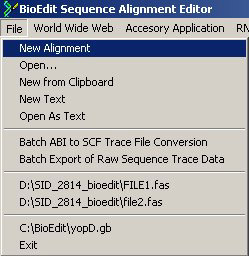
You can work with a sequence in BioEdit using the Alignment window. To create a new alignment window, select File->New Alignment from the BioEdit Sequence Alignment Editor window, as shown in Figure 4-1-1:
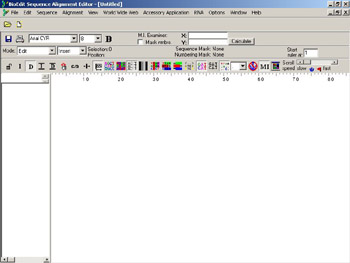
A new alignment window is created, as shown in Figure 4-1-2:
BioEdit provides the following options to align and edit a sequence:
Font: Sets the font style for the sequence, as shown in Figure 4-1-3:

Figure 4-1-3: Specifying the Font Settings
Modes: Specifies the type of operation that can be performed...

 TABLE OF CONTENTS