|
 Preface
 TABLE OF CONTENTS
 Chapter 6.4 - Open Database Connectivity (ODBC)
6.4 OPEN DATABASE CONNECTIVITY (ODBC) Open Database Connectivity (ODBC) is an Application Programming Interface (API) for abstracting a program from a database. ODBC provides a way for client applications to access a wide variety of databases or data sources. ODBC is used when database independence or simultaneous access to different data sources is required. When developing code used for interacting with a database, the developer normally needs to write program used to interact with this particular database. This method is fairly troublesome and lacks sufficient efficiency since the written code for accessing a database cannot be ported to other databases. When attempting to communicate with ODBC, the developer can only use the ODBC language, which is a standardized API by combining ODBC API function calls and SQL. It is an open standard application programming interface (API) for accessing a database. By doing so, the access to different databases using a single program becomes feasible. It should be noted that in addition to the ODBC software, the ODBC drivers for each database to be accessed should have been installed beforehand. By using ODBC statements in a program, the user can access files in heterogeneous databases such as MS SQL Server, Access, Excel, Paradox, dBase, DB2, Informix, and many others. ODBC enables the user to use SQL statements to access various databases without having to know about the exact database interfaces. ODBC is responsible for coping with the SQL statements by converting them into a database query understandable to a particular database system. The ODBC interface is a widely used API for database access. SQL is used to access and manipulate database. ODBC is designed for enabling a single application to access heterogeneous database management systems with the same source code. Database applications call functions in the ODBC interface, which are implemented in drivers. The drivers separates applications from database-specific behavior. Because drivers are loaded at run time, the developer only needs to add a new driver to access a new database management system without having to recompile the application. Since ODBC is independent of DBMS, it can be used to generate the cross-database functionality. As shown in Fig. 6.1, the ODBC architecture normally consists of the following four components: 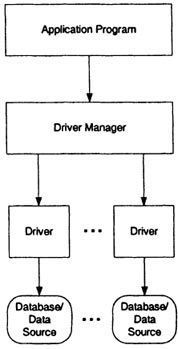 Fig. 6.1 The generic ODBC architecture.
The implementation of database management technologies in some representative industrial automation systems will be detailed by the practical applications later on. REFERENCES 1. Date, C. J. (1994). An Introduction to Database Systems, 6th ed., Addison-Wesley, Reading, MA. 2. Date, C. J., and Darwen, H. (1992). A Guide to the SQL Standard, 3rd ed., Addison-Wesley, Reading, MA. 3. Melton, J., and Simon, R. A. (1992). Understanding the New SQL: A Complete Guide, Morgan Kaufmann Publishers, San Francisco. |