AutoCAD VBA Programming: Tools and Techniques
Chapter Two: VBA Application Jump-Start

In this chapter we are going to jump right into the VBA programming environment and develop an application program. The program is not advanced, but it does serve as a good example of the power of VBA inside AutoCAD. It also gives programmers who are learning the VBA system a chance to try out the features in the programming environment by following the step-by-step procedures.

Description of the Application

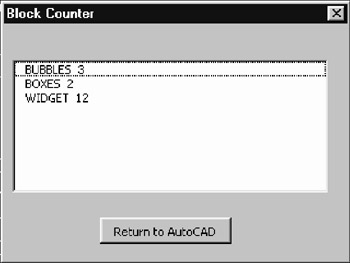
The program to be developed is the start of a bill of material counting routine. Specifically, it will count block references in the drawing and report them in a list box as seen in Figure 2.1. When the list members are selected, the block references are highlighted in the drawing.


Figure 2.1: Block Counter macro running

This application demonstrates a number of aspects of how VBA applications handle things inside AutoCAD. It also shows the true power of VBA inside AutoCAD and how objects can be used to keep the coding at a reasonable level. The application shows objects of all kinds in use, ranging from dialog box objects to AutoCAD objects.

As a teaching tool, this program involves a form for user reporting and input. It also involves blocks and the manipulation of the block table.

Selection sets, filters, basic user input, and string handling are also demonstrated in this simple example. Programmers learning how to develop applications using VBA should attempt to build the same problem by following the instructions below.

Start Your IDE

Get started by loading AutoCAD...

UNLIMITED FREE
ACCESS
TO THE WORLD'S BEST IDEAS

SUBMIT
Already a GlobalSpec user? Log in.

This is embarrasing...

An error occurred while processing the form. Please try again in a few minutes.

Customize Your GlobalSpec Experience

Category: Microprocessor and IC Programmers, Compilers, and Debuggers
Finish!
Privacy Policy

This is embarrasing...

An error occurred while processing the form. Please try again in a few minutes.