XSS Exploits: Cross Site Scripting Exploits and Defense

Viewing source is one of the critical components to finding vulnerabilities in applications. The most common way to do this is to hit Control-U in Firefox or right-click on the background and click View Source. That's the most obvious way, and also the way that will make you miss a lot of serious potential issues.
For instance, JSON is dynamic code that is returned to the page to be used by the JavaScript on that page. When Google was vulnerable to XSS through their implementation of JSON, it was invisible to the page simply by viewing the source alone. It required following the path of requests until it led to the underlying JSON function. Because Google returned the JSON as text/html instead of text/plain or text/javascript, the browser processes, or "renders," this information as HTML. Let's look at the difference between text/plain and text/html encoding types.
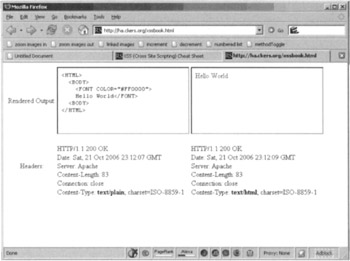
Figure 3.28 shows a sample output of some HTML in text/plain and text/html side by side in Firefox:
Firefox has done what we would expect. When the content type is text/plain, the output of the HTML from our dynamic script was not rendered. In fact, it was shown as raw text. Alternately, it does what we would expect for text/html by rendering the HTML and showing us a red "Hello World."
Figure 3.29 shows the exact same page, but this time it is in IE 7.0. However, what you'll...