MCSA/MCSE Exam 70-290: Managing and Maintaining a Windows Server 2003 Environment Study Guide

This study system gives readers 100 percent coverage of the official Microsoft 70-290 exam objectives necessary to master the exam on your first try.
 TABLE OF CONTENTS
 In Windows Server 2003, Microsoft gives us multiple ways to accomplish the same thing. We can use the graphical user interface or GUI (pronounced Goo-E) or we can use command-line utilities. Each has its own advantages and disadvantages. Typically, the GUI is easier to use. You do not have to worry about syntax. You just click your way around and get everything done. The command prompt is usually better when you need to make changes in bulk. It can be more complex than the GUI, but it supports scripting, which opens up a whole realm of possibilities.
The tool most commonly used to manage user, group, and computer accounts is Active Directory Users and Computers (ADUC). ADUC is found in the Administrative Tools folder ( Start Programs Administrative Tools Active Directory Users and Computers). In this chapter we will cover the details of using ADUC to create and manage users, groups, and computers. First, familiarize yourself with the layout of ADUC as shown in Figure 4.2.
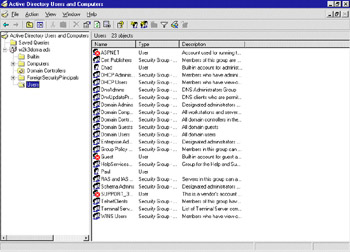
Like all of Microsoft s administrative tools in Windows Server 2003 (and Windows 2000), ADUC is built from a Microsoft Management Console (MMC). This gives all the tools a similar look and feel. The MMC is broken into two panes: the console pane on the left and the details pane on the right.








