.NET Mobile Web Developer's Guide
Learn to develop mobile Web applications for Microsoft's .NET platform.
 TABLE OF CONTENTS
 This chapter takes you from start to finish with a mobile solution using key Microsoft technologies. The goal is to make vital desktop services available to users who are in and out of the office. The solutions here include installing, configuring, and generally troubleshooting the infrastructure that lets mobile workers connect to your intranet and collect their messages and appointments on a mobile phone or Pocket PC. You ll also see an application that allows the same users to take selected corporate data with them on their Pocket PCs for use on the road.
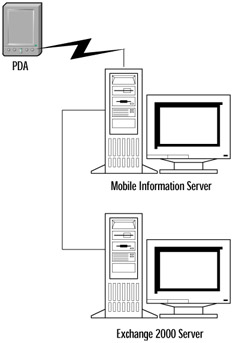
Before deploying an enterprise application using these technologies, you need to bring yourself up to speed and work out the kinks in a lab environment. You don t want to risk the expense, stress, and wrath of colleagues by causing downtime on a mission-critical server while learning to use leading-edge software. Keep in mind that backing out some of the settings due to an error can be very time consuming. Therefore, the solutions presented here show the installation and configuration in an isolated Windows domain using two lab computers and a Pocket PC that are configured as shown in Figure 7.1. Once you are comfortable that the system works as expected in the protected setting, you ll be ready to build it again in a production environment.
We explore the requirements of each technology, the installation, and the configuration. Then we ll build its portion of the overall solution. By the end...