Developing Web Services with Java APIs for XML Using WSDP
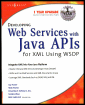
Combine XML and Java (JWSDP), craft and utilize Web Services and XML Docs in Java, and gain command of DOM, SAX and XSL.
 TABLE OF CONTENTS
 The first step in searching a business registry is connecting to it. In this section, we discuss how various interfaces/classes in the Java API for XML Registries, JAXR can be used to programmatically connect to a business registry.
To connect to a registry, we create a client program using JAXR. The client program begins by setting properties that define the URL for the registry being accessed and the class that implements the connection factory for the registry. For example, the following lines of code set the URL for IBM s test query registry (UDDI registry) that we shall be using for the examples in this chapter:
Properties props = new Properties();String curl = "http://www-3.ibm.com/services/uddi/v2beta/inquiryapi";props.setProperty("javax.xml.registry.queryManagerURL", curl);We now set the class for the connection factory implementation of the UDDI registry through the following line of code:
props.setProperty("javax.xml.registry.factoryClass", "com.sun.xml.registry.uddi.ConnectionFactoryImpl"); The next step is to instantiate the factory class and set its property as follows:
ConnectionFactory factory = ConnectionFactory.newInstance();factory.setProperties(props);
The javax.xml.registry package in JAXR provides the Connection interface that actually initiates a connection or session with the registry provider. We use the connection factory instance to create the connection as in the following line of code:
Connection connection = factory.createConnection();
If the client is behind a firewall, then to access the registry, you must specify the proxy host address and port on which the proxy service is running. This can be achieved by setting the...