Hacking the Code: ASP.NET Web Application Security

This unique book walks you through the many threats to your web application code, from managing and authorizing users and encrypting private data to filtering user input and securing XML.
 TABLE OF CONTENTS
 This section takes a closer look at the way security policies are constructed and the way you can manage them. To create and modify a security policy, the .NET Framework provides you two tools: a command-line interface (CLI) tool, called caspol.exe (see the Security Tools section), and a Microsoft Management Console snap-in, mcscorcfg.msc (see Figure A.27). We ll use the latter for demonstration purposes because it is more visual and intuitive.
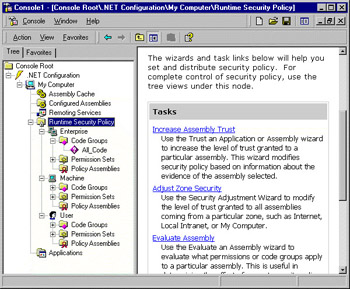
As you can see in Figure A.27, the security policy model comprises the following:
Runtime Security Policy levels
Enterprise Valid for all managed code that is used within the entire organization (enterprise); therefore, this will have by nature a restrictive policy because it references a large group of code.
Machine Valid for all managed code on that specific computer. Because this already limits the amount of code, you can be more specific with handing out permissions.
User Valid for all the managed code that runs under that Windows user. This will normally be the account that starts the process in which the CLR and managed code run. Because the identity of the user is very specific, the granted permissions can also be more specific, thus less restrictive.
A code groups hierarchy that exists for each of the three policy levels. We will look at how you can add code groups to the default structure, which already exists for user and machine.
(Named) permission sets. By default,...