The Real MCTS/MCITP Prep Kit: Upgrading Your MCSE on Windows Server 2003 to Windows Server 2008 (Exam 70-649)

Chapter 4: Maintaining an Active Directory Environment

Chapter 4: Maintaining an Active Directory Environment

1.

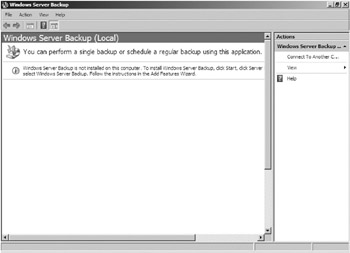
You ve just finished installing a new Windows Server 2008 DC. It is the policy of the IT department to perform a full backup of newly installed DCs. You click on Start Administrative Tools Windows Server Backup. When Windows Server Backup loads you see the following screen.

What do you need to do to ensure that the backup takes place?

  1. Run DCPROMO

  2. Install the Windows Server Backup feature

  3. Go to a command prompt and run wbadmin.exe

  4. Boot into DSRM and conduct the backup from there

2.

You are responsible for performing backups on the DCs on your network. Your boss has requested that you conduct system state backups to DVD. How do you accomplish this?

  1. Run the Windows Server Backup Wizard, select System State Backup, and set your target to the DVD drive

  2. Run the Windows Server Backup Wizard, select a local drive as the target, and then copy the system state backup to the DVD drive

  3. Run the wbadmin.exe command with the start systemstatebackup command and target it to the DVD drive

  4. Run the wbadmin.exe command with the start systemstatebackup command, set the target to a local fixed drive, and then copy the system state backup to a DVD

3.

You are the network administrator for your company. Last night you successfully performed a system state backup of one of your...

UNLIMITED FREE
ACCESS
TO THE WORLD'S BEST IDEAS

SUBMIT
Already a GlobalSpec user? Log in.

This is embarrasing...

An error occurred while processing the form. Please try again in a few minutes.

Customize Your GlobalSpec Experience

Category: Backup and Recovery Software
Finish!
Privacy Policy

This is embarrasing...

An error occurred while processing the form. Please try again in a few minutes.