Understanding WMI Scripting
This resource explains to Windows and Exchange Administrators how they can use the Windows Management Instrumentation (WMI) scriptable technology available in these products to ease their day-to-day management tasks.
 TABLE OF CONTENTS
 In the previous paragraph, based on the moniker type provided, we saw that it is possible to obtain two different WMI objects:
SWbemObject with the moniker
winmgmts://NET-DPEN6400A/Root/CIMv2:Win32_Service.name="SNMP"'
or
winmgmts://NET-DPEN6400A/Root/CIMv2:Win32_Service
SWbemServices with the moniker
winmgmts://NET-DPEN6400A/Root/CIMv2
These two objects are part of the WMI scripting API. The WMI scripting API is a collection of COM objects enabling a script writer to read or write information and perform various operations with WMI and the real world manageable entities that the CIM repository represents. The WMI scripting object model exposes two different natures of objects that can be categorized as follows:
Single objects
Collections of objects
The nature of the object desired determines the way the object is instantiated. There are two different ways to instantiate objects with WMI:
Using a language statement to create an object with the COM ProgID. Based on the script language used, the script code will use a CreateObject for VBScript, a new ActiveXObject for JScript, or an XML
Using the WMI moniker with the GetObject statement for VBScript or JScript.
The different object natures with their associated instantiation methods are summarized in Figure 4.2 as represented by the Microsoft SDK.
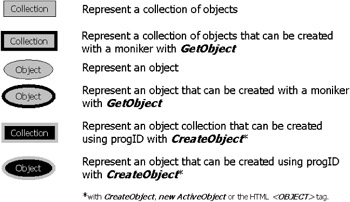
Symbols are used to differentiate the objects. In the following sections, we examine the WMI scripting API object model tree and explain the relationship between the...








