Configuring IPv6 with Cisco IOS

Evaluates the IPv6 architecture and elements, troubleshooting, screening, security and more.
 TABLE OF CONTENTS
 Unlike with RIP, a specific version of IS-IS was not written to support IPv6; rather, extensions were written into the protocol to provide this support. This is because of the modular architecture of IS-IS. So the configuration for IS-IS is somewhat different from the configuration for RIP.
You perform initial configuration for IPv6 IS-IS the same as you do the configuration for standard IPv4 IS-IS: through the use of the router isis command. You should then directly follow this command with the net command, specifying the network entity address for the router. IPv6 support comes into play at the interface level when assigning an IPv6 address to the router by using the ipv6 address command followed by the ipv6 router isis < area> command. Figure 6.4 shows an example of a basic IS-IS network.
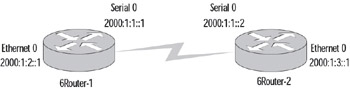
In the following configuration example we are using the two routers shown in Figure 6.4, 6Router-1 and 6Router-2 respectively.
6Router-1#<b class="bold">config t</b>Enter configuration commands, one per line. End with CNTL/Z.6Router-1(config)# <b class="bold">clns routing</b>6Router-1(config)# <b class="bold">router isis cisco</b>6Router-1(config-router)# <b class="bold">net 49.aaaa.bbbb.cccc.dddd.0000.2222.2222.2222.00</b>6Router-1(config-router)# <b class="bold">exit</b>6Router-1(config)# <b class="bold">interface ethernet 0</b>6Router-1(config-if)# <b class="bold">ipv6 address 2000:1:2::1/64</b>6Router-1(config-if)# <b class="bold">ipv6 router isis cisco</b>6Router-1(config-if)# <b class="bold">interface serial 0</b>6Router-1(config-if)# <b class="bold">ipv6 address 2000:1:1::1/64</b><a name="438"></a><a name="beginpage.282F4BB9-7CD3-4980-9B8B-84694A06C730"></a>6Router-1(config-if)# <b class="bold">ipv6 router isis cisco</b>6Router-1(config-if)# <b class="bold">exit</b>6Router-2#<b class="bold">config t</b>Enter configuration commands, one per line. End with CNTL/Z.6Router-2(config)# <b class="bold">clns routing</b>6Router-2(config)# <b class="bold">router isis cisco</b>6Router-2(config-router)# <b class="bold">net 49.aaaa.bbbb.cccc.dddd.0000.2222.2222.2223.01</b>6Router-2(config-router)# <b class="bold">exit</b>6Router-2(config)# <b class="bold">interface ethernet 0</b>6Router-2(config-if)# <b class="bold">ipv6 address 2000:1:3::1/64</b>6Router-2(config-if)#...