CYA: Securing Exchange Server 2003 and Outlook Web Access: Cover Your A** By Getting It Right the First Time

Understanding Server Roles

When Windows Server 2003 is installed on a computer, it provides a wide variety of tools and functionality. However, additional features may still need to be installed on the server to bring clients the services they need. The server may need to supply file and print services, authenticate users, or support a local intranet Web site. Until Windows Server 2003 is configured to supply these services, clients will be unable to use the server in a manner that is required by the organization.

Server roles are profiles that are used to configure Windows Server 2003 to provide specific functionality to the network. When you set up a server to use a specific role, various services and tools are enabled or installed, and the server is configured to provide additional services and resources to network clients. Roles are applied to machines using the Configure Your Server Wizard and managed using the Manage Your Server tool.

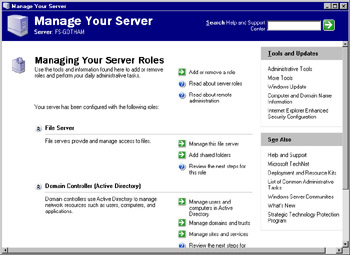
As shown in Figure A.1, Manage Your Server provides information about the roles that are currently configured for a server, and it provides the ability to add and remove roles from a server. Depending on your server s settings, this tool will start automatically upon logon. If you ve checked the Don t display this page at logon check box at the bottom of this window, Manage Your Server will not start automatically. You can start it manually by selecting Start Administrative Tools Manage Your Server.


Figure A.1: The Main Manage...

UNLIMITED FREE
ACCESS
TO THE WORLD'S BEST IDEAS

SUBMIT
Already a GlobalSpec user? Log in.

This is embarrasing...

An error occurred while processing the form. Please try again in a few minutes.

Customize Your GlobalSpec Experience

Category: Web Application Software
Finish!
Privacy Policy

This is embarrasing...

An error occurred while processing the form. Please try again in a few minutes.