Practical Financial Modelling : A Guide to Current Practice

I find it hard to enthuse about array formulae. It is true that they can perform some spectacularly complex calculations, but in routine use they are of little value and generally fall foul of the principle of error reduction. They are difficult to edit, difficult to understand, and, if referring to large arrays, they can slow down the recalculation of a model. We should also recognise that few analysts, in practice, would claim to be familiar with array formulae, so you may find colleagues unwilling or unable to help you if you get stuck.
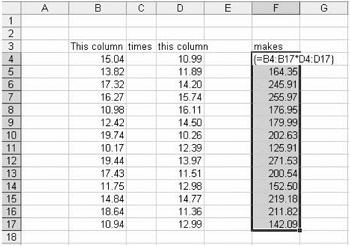
According to Excel Help, an array formula 'can perform multiple calculations and then return either a single result or multiple results'. In practice this means that we can, for example, multiply one block of cells by another block of cells. The formula is written as:
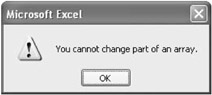
We press Ctrl+Shift+Enter to enter the formula. The commonest errors are failing to select the full range of cells to contain the array formula, and having either too few or too many cells in the selection. The next commonest error is then editing the formula and forgetting the Ctrl+Shift+Enter trick, so that Excel complains that it cannot be part of an array press Esc to continue.
Another example is to perform an array calculation with the results in one cell. We can use the audit sheet created in Chapter...