AutoCAD: Secrets Every User Should Know

Sometimes an AutoLISP program needs to open an existing file, because you want to either read data from it or add data to it. To demonstrate this kind of file management and to show you a little more about handling strings, let s look at a program that solves a small problem with AutoCAD: determining what release format a specific drawing was last saved in.
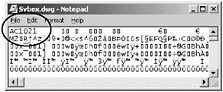
Every AutoCAD DWG file has a six-character string at the beginning of the file that indicates the format in which the drawing was saved. You can see the code for any AutoCAD drawing by opening the DWG file in a text editor. The rest of the file is unreadable, of course, but you can see those six characters. Except for the first release of AutoCAD (1.1), the first two characters are always AC, so the characters that denote the release are the third, fourth, fifth, and sixth.

The AutoLISP program in Listing 9.12 uses the GETFILED function to prompt the user to select a DWG file using the dialog box shown in Figure 9.3, and then opens the specified file, reads the key characters, closes the file, sends a message to the screen via the ALERT function, opens a text file, adds the same information to the text file, and finally closes that file. This version refers only to releases R14 through AutoCAD 2007. If you want to go back further than that, see the last program in this chapter. I m...