A Guide to MATLAB Object-Oriented Programming
Chapter 12: Constructing Simple Hierarchies with Inheritance

OVERVIEW

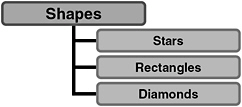
Using cShape, we have drawn shapes that look like a star, a rectangle, and a diamond. [*] Even though these three shapes have a lot in common, we still recognize them as three different shapes. The organization of this simple shape taxonomy looks like Figure 12.1. With inheritance, we can build a set of classes to recreate this taxonomy without copying a lot of code. Member functions common to all shapes are found only in /@cShape. Member functions with code tailored for each particular shape type are found in each particular directory. Inheritance is the glue that allows us to build the hierarchy and allows MATLAB to find the appropriate function.


Figure 12.1: The simple shape taxonomy.

Inheritance builds a hierarchy by allowing us to specify a relationship between a parent and child class. In the relationship, a child class is said to inherit attributes and behaviors from the parent. [**] Behaviors are synonymous with member functions, and in MATLAB, finding a member function involves the function path. For sure, MATLAB will search for a function in the child class directory. With inheritance, if the function is not found in the child s directory, MATLAB will also search the parent s directory. If we are going to allow MATLAB to call one of the parent s functions, the object must contain all of the parent s member variables. The second part of inheritance relates to data. A child object contains all parent data but parent data are still encapsulated.

UNLIMITED FREE
ACCESS
TO THE WORLD'S BEST IDEAS

SUBMIT
Already a GlobalSpec user? Log in.

This is embarrasing...

An error occurred while processing the form. Please try again in a few minutes.

Customize Your GlobalSpec Experience

Category: Metal Shapes and Stock
Finish!
Privacy Policy

This is embarrasing...

An error occurred while processing the form. Please try again in a few minutes.