Essential MATLAB for Engineers and Scientists, Third Edition

Chapter 7: Introduction to Graphics

Overview

The objective of this chapter is to introduce you to

  • MATLAB's high-level 2-D and 3-D plotting facilities.

A picture, it is said, is worth a thousand words. MATLAB has a powerful graphics system for presenting and visualizing data, which is reasonably easy to use. (Most of the figures in this book have been generated by MATLAB.)

This chapter introduces MATLAB's high-level 2-D and 3-D plotting facilities. Low-level features, such as handle graphics, are discussed later in this chapter.

It should be stressed that the treatment of graphics in this chapter is of necessity brief, and intended to give you a glimpse of the richness and power of MATLAB graphics. For the full treatment, you should consult help on the functions mentioned in this chapter, as well as the comprehensive list of graphics functions in the online Help, under MATLAB: Reference: MATLAB Function Reference: Functions by Category: Graphics.

7.1 Basic 2-D Graphs

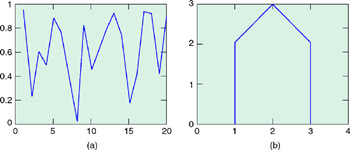
Graphs (in 2-D) are drawn with the plot statement. In its simplest form, it takes a single vector argument as in plot(y). In this case the elements of y are plotted against their indexes, e.g. plot(rand(1, 20)) plots 20 random numbers against the integers 1-20, joining successive points with straight lines, as in Figure 7.1(a). If y is a matrix, its columns are plotted against element indexes.


Figure 7.1: Examples of plot

Axes are automatically scaled and drawn to include the minimum and maximum data points.

Probably the most common form of

UNLIMITED FREE
ACCESS
TO THE WORLD'S BEST IDEAS

SUBMIT
Already a GlobalSpec user? Log in.

This is embarrasing...

An error occurred while processing the form. Please try again in a few minutes.

Customize Your GlobalSpec Experience

Category: Chart Recorders
Finish!
Privacy Policy

This is embarrasing...

An error occurred while processing the form. Please try again in a few minutes.