GUI Bloopers: Don'ts and Do's for Software Developers and Web Designers
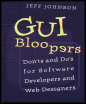
This book cuts right to the core of the most common interface problems, offering real-world advice to the computer software programmer.
 TABLE OF CONTENTS
 Most software applications these days are built using graphical user interface (GUI) development tools. Such tools provide a set of controls also known as "widgets" out of which user interfaces can be composed. The controls include such interactive devices as editable text fields, number fields, checkboxes, radiobuttons, sliders, scrollbars, buttons, knobs, dials, meters, and various sorts of menus.
Some GUI tools are referred to as "toolkits"; they are essentially libraries of user interface components. Other GUI tools are called user "interface management systems" (UIMSs); they are prebuilt application infrastructures that provide not only user interface components, but also runtime support for communication between user interface components and application semantic modules. Some GUI toolkits and UIMSs provide "builder" programs that allow designers to create user interfaces interactively and visually, by dragging the desired components into position using a pointing device. Others require developers to describe the desired user interface (i.e., the components of which it is to be composed) using a programming language. (For more details, see Zarmer and Johnson [1990].)
The distinction between UIMSs and GUI toolkits is not relevant to this book. Also irrelevant here is the distinction between interactive and programmatic specification of user interfaces. Throughout this book the terms "GUI tool" and "GUI toolkit" are used generically, to refer to all component-based user interface development tools and building blocks.
GUI tools are supposed to ease the task of developing graphical user interfaces and thereby make programmers more productive. However, most existing GUI toolkits fail to fulfill this promise...