Check Point NGX R65 Security Administration

The Check Point security suite is managed by the SmartCenter Server software. This chapter covers the set of graphical client software used to manage the SmartCenter server. Many people say this set of SmartClient management interfaces is among the best in the industry. One example of such an impressive interface is SmartView Tracker, a tool that lets you have a detailed view of all log files collected from different Check Point components. Moreover this is all in real time, with tons of flexible filters and views (see the SmartView Tracker section for more details).
SmartDashboard is a powerful GUI, yet it is intuitive and user-friendly, and has been the hallmark of the Check Point FireWall-1/VPN-1 framework. For anyone interested in learning FireWall-1/VPN-1, it is critical to understand and become fully familiar with this all-encompassing user interface, which is fully integrated with myriad offerings from Check Point. Understanding its components will help users to translate the security policy vision of any organization into reality.
This section covers the main elements of SmartDashboard, emphasizing changes introduced in the NGX R65.
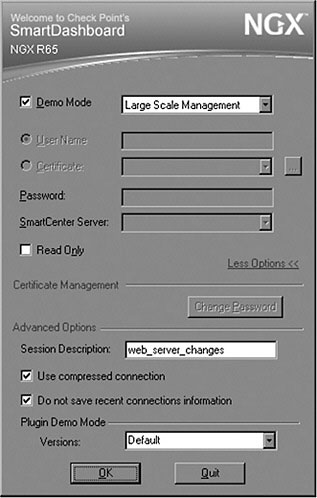
Check Point introduced its new plug-in technology in the NGX R65, and you can see the first signs of its introduction at the log-in interface to SmartDashboard, as shown in Figure 2.1.
Note that Plugin Demo Mode becomes active only while you re logging in with Demo Mode selected. Also notice the Session Description section...