Virtualization with VMware ESX Server

In this chapter we review some of the advanced configuration possibilities for both your ESX Server and your virtual machines. VMware provides tremendous flexibility with configuration possibilities. We look at network bandwidth shaping and disk shaping as well as different memory configuration possibilities. We also examine your ability to set CPU affinity and finally explore clustering options. We end with an explanation of how to set up a cluster in a box and a complete walkthrough of setting up a Windows Cluster Service.
ESX Server allows you to control certain aspects of network traffic on your virtual machines. ESX Server can control three areas of outgoing network traffic:
Average bandwidth
Peak bandwidth
Burst size
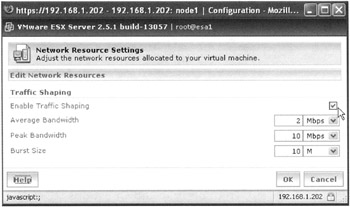
To enable network traffic shaping, open the details page of the virtual server you want to configure. Click the Network tab. Mark the check box to Enable Traffic Shaping and place the values you want in the appropriate boxes (see Figure 4.1).
The values you choose can be bits per second, kilobits per second, or megabits per second. Behind the scenes, this selection essentially enables the nfshaper module. To read more about nfshaper, at the command line of your ESX Server type:
#man nfshaper
If you are running virtual servers that require heavy access to disks such as a file, messaging, or database server you may want to modify the bandwidth allocation values for that virtual machine. VMware ESX Server uses an allocation policy ...