Virtualization with VMware ESX Server

Using VirtualCenter to Administer Your Virtual Infrastructure

VirtualCenter is the most versatile and essential administrative tool for managing a virtual infrastructure available today. A single VirtualCenter server deployment enables you to manage hundreds of managed hosts and thousands of virtual machines. Even in the largest deployments, you can easily scale VirtualCenter servers to meet all the administrative needs of your virtual infrastructure. This section outlines the most common administrative tasks you ll need to perform within VirtualCenter to maintain your virtual machines and manage new deployments of virtual machines from templates to cloned VMs. The installation and security of VirtualCenter have already been discussed. This section focuses on provisioning new servers (VMs), customizing templates, managing performance and alarms, and migrating virtual machines between hosts using cold migration and VMotion (hot migrations).

Creating Virtual Machine Groups

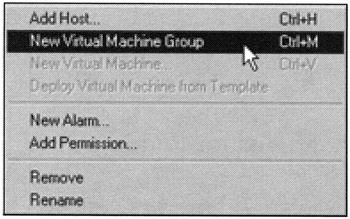
We d like to quickly cover the creation of virtual machine groups. This task is very similar to creating the other organizational components in VirtualCenter. VM Groups can be created within farms or other VM groups. To create a new VM group, simply right-click on a farm or virtual machine group and select New Virtual Machine Group, as shown in Figure 9.48.


Figure 9.48: A Popup Menu to Create New Virtual Machine Group

This will create a new virtual machine group that you can name based on the types of VMs it will contain or the function of the VMs in the group. Now would be a good time to set the appropriate permissions for the...

UNLIMITED FREE
ACCESS
TO THE WORLD'S BEST IDEAS

SUBMIT
Already a GlobalSpec user? Log in.

This is embarrasing...

An error occurred while processing the form. Please try again in a few minutes.

Customize Your GlobalSpec Experience

Category: VPN Software
Finish!
Privacy Policy

This is embarrasing...

An error occurred while processing the form. Please try again in a few minutes.