WarDriving: Drive, Detect, Defend: A Guide to Wireless Security

Chapter 6: Configuring and Using Kismet

Introduction

Now that you have installed Kismet, you are ready to begin configuring and using it on your Linux distribution of choice. Unlike NetStumbler, which is basically ready to use once it is installed, Kismet requires some post-installation configuration in order to be functional. This chapter will detail that post-installation configuration.

First, we ll take a look at installing and configuring the Global Positioning System Daemon (GPSD) for use with Kismet.

Using the Global Positioning System Daemon (GPSD) with Kismet

In order to map the WarDrive results garnered with Kismet, you need to install and configure GPSD. GPSD is a Linux add-on daemon written by Russ Nelson and is available for download at: www.pygps.org/gpsd/downloads/. The current version of GPSD is gspd-1.10. This section details the installation and usage of GPSD with Kismet.

Note

GPSD is not required in order to successfully use Kismet. If you do not intend to map your results, you can skip this section.

Installing GPSD

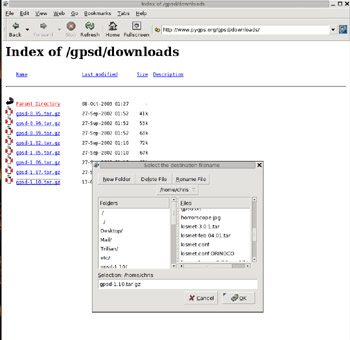
Installing GPSD is a very straightforward process. First, download gpsd-1.10.tar.gz from www.pygps.org/gpsd/downloads/gpsd-1.10.tar.gz, as shown in Figure 6.1.


Figure 6.1: Downloading GPSD

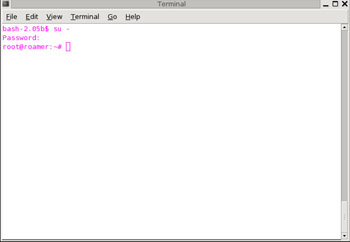
Next, you need to make sure that you have changed to the root user, as shown in Figure 6.2, if you have not done so already.


Figure 6.2: Becoming the Root User
Note

All of the examples and screenshots were done in Slackware Linux 9.1; however, the steps taken and commands required are the same regardless of the Linux version you are using.
Ck3k provided the USB cable screenshot...

UNLIMITED FREE
ACCESS
TO THE WORLD'S BEST IDEAS

SUBMIT
Already a GlobalSpec user? Log in.

This is embarrasing...

An error occurred while processing the form. Please try again in a few minutes.

Customize Your GlobalSpec Experience

Category: Device Drivers
Finish!
Privacy Policy

This is embarrasing...

An error occurred while processing the form. Please try again in a few minutes.