WarDriving: Drive, Detect, Defend: A Guide to Wireless Security
WiFi Protected Access (WPA) is designed to provide wireless users with an encryption mechanism that is not susceptible to the vulnerabilities of Wired Equivalent Privacy (WEP). Most 802.11g access points either ship with the option to use WPA or a firmware upgrade can be downloaded from the access point manufacturer.
Before enabling WPA, you should ensure that your wireless card has WPA drivers. As with access points, you often need to update the card s drivers, firmware, or both in order to take advantage of WPA. This section details how to set up WPA encryption on two access points: the D-Link DI-624 and the Linksys WRV54G. You will also learn how to configure your wireless client to use WPA.
The D-Link DI-624 ships with WPA capability. This means that no firmware upgrade is necessary and you can start using WPA as soon as the DI-624 comes
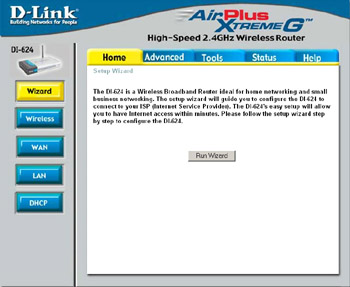
out of the box. First, you need to log into the DI-624 from a wired connection. Then, point your browser to 192.168.0.1 and supply the username admin with a blank password when prompted. This opens the initial configuration screen, as seen in Figure 11.1.
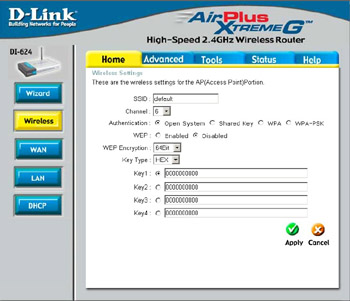
Next, click the Wireless button on the left to open the wireless configuration options window, as shown in Figure 11.2.
WPA-PSK...