Embedded Systems Firmware Demystified
Provides a roadmap for embedded system startups, demonstrates how to develop tools for 21 platforms, and more.
 TABLE OF CONTENTS
 I ve mentioned several times that an application resides on top of the monitor. The monitor supports an application much like DOS does, with many of the same benefits. The monitor provides a platform on which the application runs. Because the application can use the monitor s API to access platform resources, it is insulated from the gory details of the underlying hardware. This chapter shows how the application and monitor can live happily together on the target system.
Because I am building an application to run on top of the monitor and because the model of the monitor is that the application is loaded from TFS to RAM space, the application s memory map becomes much simpler. As a matter of fact, all of the application can reside in the same block of RAM or DRAM space. The monitor s loader (part of TFS) automatically transfers the contents of the executable file in TFS flash to the RAM space.
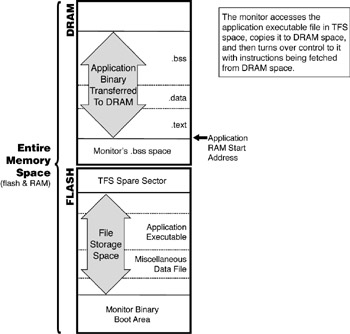
The application can assume that it is being run out of an environment that has already booted the target. Thus, many things can be left untouched, since the monitor already takes care of them at boot time. The application doesn t need to worry about the reset vector. In fact, because the monitor has initialized all of the exception handlers, the application can ignore all but the exception handlers that are specific to its needs.
Recall that, for the...