Dr. Tom Shinder's Configuring ISA Server 2004

Throughout this book, we will give examples of how to configure the ISA firewall. Each of the exercises and configuration options will be within the context of the sample network we configured for this book. You can replicate this configuration on a lab network. Your lab network can consist of computers, or you can use operating system virtualization software to simulate the lab network configuration we use in this book. Microsoft Virtual PC and VMware Workstation are the two most popular operating system virtualization applications. We prefer, and have used, VMware extensively in our ISA firewall testing and modeling environment because of its advanced networking features. However, Microsoft Virtual PC or Virtual Server is adequate for most ISA firewall testing scenarios.
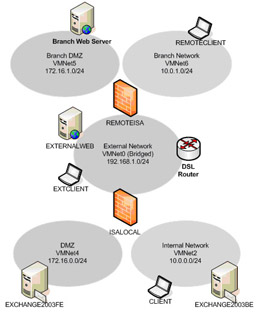
Figure 4.7 depicts the machines and some of the details of the machines in the lab network that forms that basis of the discussions in this book.
Tables 4.3 and 4.4 provide most of the salient details of the machines participating in the lab network setup.
| Setting | EXCHANGE 2003BE | CLIENT | EXCHANGE 2003FE | ISALOCAL | EXTCLIENT |
|---|---|---|---|---|---|
| IP Address | 10.0.0.2 | 10.0.0.3 | 172.16.0.2 | Int: 10.0.0.1 Ext: 192.168.1.70 Dmz: 172.16.0.1 | 192.168.1.90 |
| Default Gateway | 10.0.0.1 A | 10.0.0.1 | 172.16.0.1 | 192.168.1.60 | N/ |
| DNS | 10.0.0.2 | 10.0.0.2 | 10.0.0.2 | Int: 10.0.0.2 Ext: N/A Dmz: N/A |