3D Modeling in AutoCAD: Creating and Using 3D Models in AutoCAD 2000, 2000i, 2002, Second Edition
Chapter 18: Lights in Renderings

Overview

Lights are an essential component of renderings, and you will install a variety of lights in each of your renderings to obtain a realistic representation of your model.

This chapter

  • describes the properties of rendering lighting;

  • discusses the four types of AutoCAD rendering lights ambient lights, distant lights, point lights, and spotlights;

  • explains how to cast shadows with rendering lights;

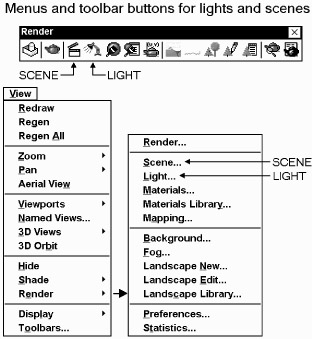
  • tells you how to use the numerous dialog boxes of the LIGHT command;

  • tells you what scenes are, how to use them, and how to create them.

Most of this chapter is devoted to the one AutoCAD command LIGHT that both creates rendering lights and modifies them after they have been installed. In addition to lighting, the parameters for viewing the objects that are to be rendered is also very important. Because lights and views are such important components of a rendering, AutoCAD has a special command SCENE for combining and managing them.

Properties of Rendering Lighting

A key characteristic in AutoCAD lighting, as well as in real-world lighting, is that surfaces directly facing a light are brighter than surfaces that are inclined to the light. This is illustrated by the 16-sided extruded polygon in the following figure. The face on the polygon that directly faces the incoming light beams, which are traveling in the same direction as the view's line of sight, is the brightest, and the brightness of the other faces is directly proportional to their angle with the light beams. The more a face is inclined to the light beams, the...

UNLIMITED FREE
ACCESS
TO THE WORLD'S BEST IDEAS

SUBMIT
Already a GlobalSpec user? Log in.

This is embarrasing...

An error occurred while processing the form. Please try again in a few minutes.

Customize Your GlobalSpec Experience

Category: Lighting Fixtures
Finish!
Privacy Policy

This is embarrasing...

An error occurred while processing the form. Please try again in a few minutes.