3D Modeling in AutoCAD: Creating and Using 3D Models in AutoCAD 2000, 2000i, 2002, Second Edition
Chapter 19: Rendering Materials

Overview

An AutoCAD rendering material is a set of properties that controls the appearance of a surface object during a rendering. For example, you can create a material that is shiny and red, and attach that material to one or more surface objects such as a polygon mesh, a 3D face, or a 3D solid to have those surfaces appear to be shiny and red when they are rendered.

This chapter

  • describes the properties, or attributes as they are generally called, that can be assigned to a material;

  • explains how bitmap images can be incorporated into rendering materials to simulate bricks, floor tile, and other pattered material;

  • tells you how to adjust the scale and location of bitmap images to accommodate various surface shapes and orientations;

  • discusses the mechanics of attaching and managing materials;

  • describes how to assemble and save a collection of rendering materials.

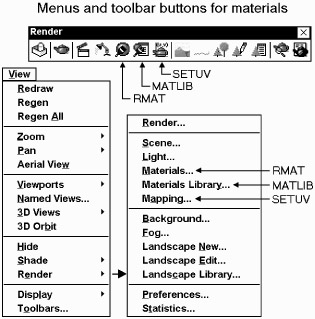
Materials are created through the RMAT command. Similar to the LIGHT command discussed in the previous chapter, RMAT is a flexible command that uses numerous dialog boxes to define a material. Because creating a material can be an involved process, each material is given a unique name, and you can save a material in a file so that it can be retrieved and used in other drawings. AutoCAD refers to these files of saved materials as material libraries and has a command, MATLIB, for managing them.

For simulating objects that have texture or patterns such as wooden boards, brick walls, shingled roofs, galvanized steel, and tiled floors you...

UNLIMITED FREE
ACCESS
TO THE WORLD'S BEST IDEAS

SUBMIT
Already a GlobalSpec user? Log in.

This is embarrasing...

An error occurred while processing the form. Please try again in a few minutes.

Customize Your GlobalSpec Experience

Category: Computer-Aided Design (CAD) Services
Finish!
Privacy Policy

This is embarrasing...

An error occurred while processing the form. Please try again in a few minutes.