The AutoCADET's Guide to Visual LISP: Optimize and Customize Your AutoCAD Design Environment

A dialog box is a rectangular area of the screen where data is displayed and selections are made using a pointing device and the keyboard. Operators can select elements in the order they want, but they can select only the items you decide to enable and display. In this way, dialog boxes provide the programmer with an excellent tool for controlling input alternatives.
In this chapter, you find out how to create a dialog box in Visual LISP, a process that is different in other programming languages such as Visual Basic and Visual C++. Other languages have easy-to-use graphical editors. In Visual LISP, you design dialog boxes in a Dialog Control Language file using a text language, and then display the file to see how the dialog box looks.
Dialog box programming is more complex than basic command-line input or graphics input, and in this chapter I introduce only the basics. For details, see the online help in Visual LISP.
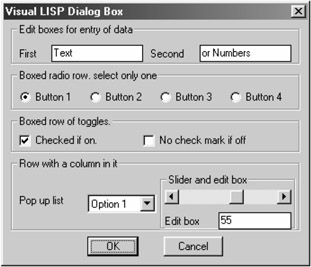
In this section, you begin by looking at how dialog boxes work and what is needed from a programming point of view to make one work. The major components that make up a dialog box are shown in Figure 11.1. Here, you look at how the components work from a programmer's perspective.
First, a dialog box is designed and programmed before the application runs. Although some dialog boxes may alter their appearance when the program is running,...