Configuring NetScreen Firewalls

This book offers novice users a complete opportunity to learn the NetScreen firewall appliance, covering all of the aspects of the NetScreen product line from the SOHO devices to the Enterprise NetScreen firewalls.
 TABLE OF CONTENTS
 Before you can configure the NetScreens to be used in your NSRP cluster, you must do the cabling. There are a few options available; this section covers the advantages and disadvantages of the most common ones. What is presented here is not an exhaustive list; however, it should be enough for you to properly evaluate your own proposed setup, and then make an informed decision based on that evaluation.
The five different ways of cabling discussed here are grouped into two categories: traffic links and HA links. For the traffic links, the three main choices are to connect the firewalls directly to the routers, connect the firewalls to the routers via switches, or connect the firewalls in a full mesh. The HA links can either be directly connected between the NetScreens or connected via switches (see Figure 13.7).
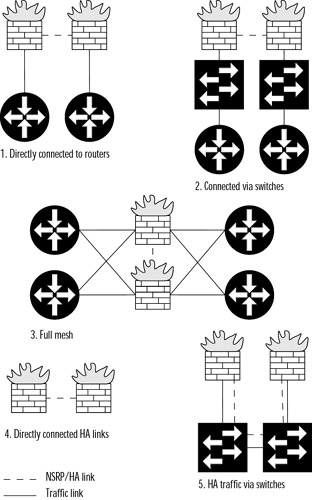
This option reviews the advantages and disadvantages of cabling by connecting the NetScreens directly to the next hop routers.
Interface failure on the router is immediately detected, resulting in faster failover.
There is less risk of failure (one less point of failure) without a switch in between.
It is not possible to have a secondary HA path.
Tracking a VRRP primary IP address is slightly more complicated.
Most of these advantages are self-explanatory, but the disadvantages require some elaboration. A secondary HA path can be configured to use in...