The Best Damn Exchange, SQL and IIS Book Period

When the Edge Transport server has been fully deployed, the next step is to put it into production by routing incoming as well as outgoing messages through this server. To route incoming messages through it, you need to point the organization s MX or Mail Exchange record(s) to this server, unless you ve got another Internet-facing SMTP server in front of your Edge Transport server, in which case you should just configure your Internet-facing SMTP server to forward all messages to the Edge Transport server.
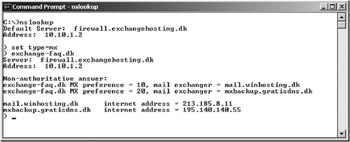
To see the MX records for your domain, perform the following steps:
Open a Command Prompt window.
Type Nslookup and press Enter.
Now type Set type=MX.
Type your SMTP domain (such as domain.com) and press Enter.
This sequence of steps will list the MX records for your SMTP domain, similar to what is shown in Figure 7.60.
You can also use a Web-based service such as www.checkdns.net or www.dnsreport.com to retrieve your MX record information.
If you ve got more than one MX record, the one with the lowest preference number is typically the one you should worry about, since any MX record with higher preference numbers are secondary MX record servers for your domain (that is, servers that will receive any messages, whereas for some reason your primary MX record doesn t respond to an EHLO or