The Best Damn Exchange, SQL and IIS Book Period

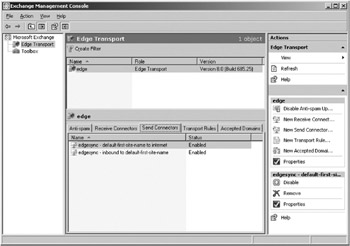
To see whether the Hub Transport server configuration data has propagated properly to the Edge Transport server, you should verify that a send connector has been created on the server. You do so by performing the following steps:
Log onto the Edge Transport server.
Open the EMC.
Click the Edge Transport node in the navigation tree in the left pane.
Now click the Send Connectors tab in the Work pane (see Figure 7.19).
Figure 7.19: The Send Connector on the Edge Transport Server
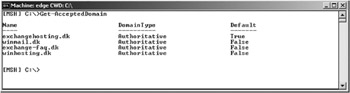
Verify that a Send connector has been created. Also make sure that each domain listed under the Accepted Domains tab on the Hub Transport server is listed when you type Get-AcceptedDomain in the EMS on the Edge Transport server. You should get a list similar to the one shown in Figure 7.20.
Figure 7.20: Listing the Accepted Domain
If everything is as expected, you now have a working Edge Transport server in your parameter network (your DMZ or screened subnet). Congratulations!
No matter whether you plan to deploy an edge transport server in your organization or you simply will configure the hub transport server as the Internet-facing server, it s recommended that you create a postmaster mailbox. Since by now you most likely have installed a hub transport server in your organization, chances are you already have created a postmaster...