How to Cheat at Administering Office Communications Server 2007

In Chapter 4, we covered installation and configuration of the Microsoft Office Communicator (MOC) client. In this appendix, we ll discuss how to customize MOC to extract more features out of this product. Specifically, we ll discuss adding custom presence status messages, adding more tabs to MOC, and customizing menu commands.
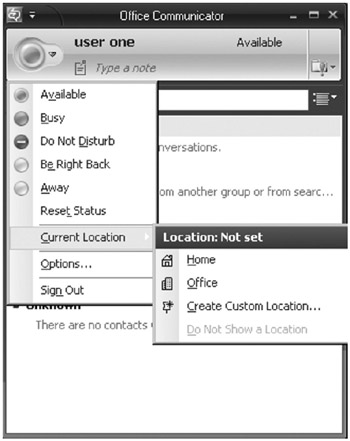
Once you sign in to MOC, you ll find various status options available to you. You can also set the status during sign-in. The following options are available to you (see Figure A.1):
Available
Busy
Do Not Disturb
Be Right Back
Away
In addition to these, you can also add more specific presence messages by tweaking the client application. Let s work through this short exercise to configure custom presence states:
Open Notepad (you may also use XML Notepad 2007) and create an XML configuration file with the following code:
?xml> Working from Home activity 2 for 1044 activity 3 for 1055 In a Meeting In Conference Room-1 Meeting with Customer Meeting with Client Meeting with Team Interviewing
| Note | XML Notepad 2007 is available for download from www.microsoft.com/ downloads. XML Notepad gives you an easy-to-use, intuitive interface to create and view XML files. |
Save the file as customp.xml on a shared folder of your server (\\demo\share).
Click on Start Run and type regedit.
Locate the HKEY_LOCAL_MACHINE\SOFTWARE\Policies\Microsoft\ Communicator key.
Right-click on the right pane, select New