How to Cheat at Securing a Wireless Network
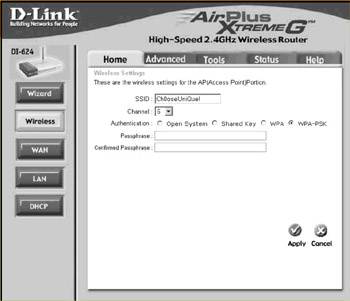
To enable WPA on the access point, on the left side of the screen click the Wireless button.To enable WPA, click the radio button labeled WPA-PSK next to the Authentication option (see Figure 2.20).
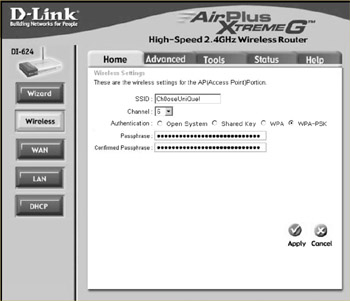
Enter a passphrase into the Passphrase text box, and retype the passphrase in the Confirmed Passphrase text box to verify it, as shown in Figure 2.21.
Click Apply to confirm the settings and enjoy added wireless security protection!
After you have set a unique SSID and enabled 128-bit WEP encryption, you should filter access to the wireless network by Media Access Control (MAC) address.
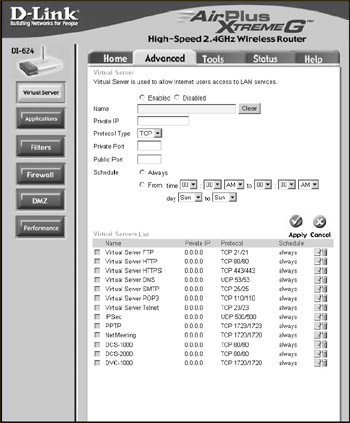
First click the Advanced tab, as shown in Figure 2.22.
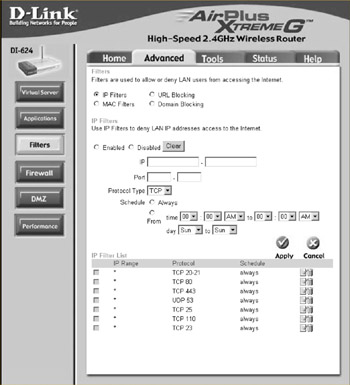
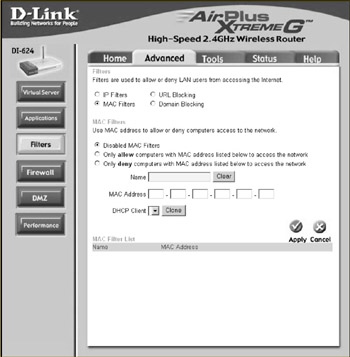
Next click the Filters button on the left side of the screen, as shown in Figure 2.23.
Then choose the MAC Filters radio button.This makes the MAC filtering options visible, as shown in Figure 2.24.
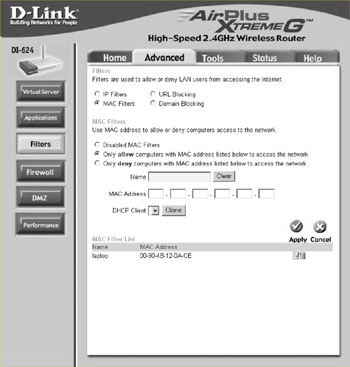
Finally, select the Only allow computers with MAC address listed below to access the network radio button and enter the MAC address of each client card that is allowed to access the network.You must also enter a descriptive name of your choice for each client in the Name text box (see Figure 2.25). Note that you must click Apply after each MAC address entered.