How to Cheat at Securing a Wireless Network
After you have configured your access points to utilize security measures, you will need to configure each wireless client to work with your access points.This means that each wireless client needs to be configured with the correct SSID and have the appropriate WEP key entered and selected. We will also look at enabling WPA on certain clients for use in a WPA-enabled environment.
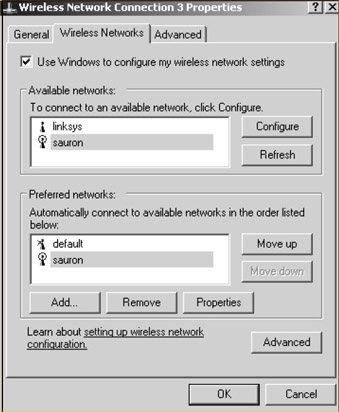
For Windows XP Clients, double-click the Wireless Network Connections icon on the taskbar to bring up the Wireless Network Connection Properties window (see Figure 2.58).
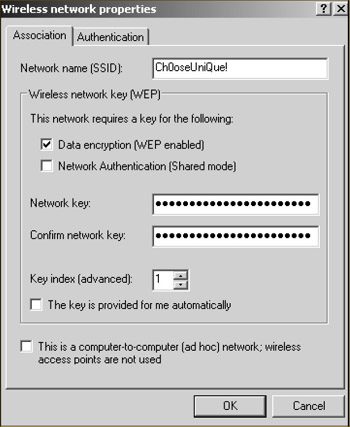
Next click the Add button to add a new preferred network. Enter the SSID of your network in the SSID text box, and uncheck The key is provided for me automatically.Then enter the WEP key for your wireless network in the Network Key and Confirm Network Key text boxes, as shown in Figure 2.59.
Finally, choose the appropriate key index (1 4) and click OK. If your settings are correct, you will be connected to your access point.
Configuring Windows XP clients for WPA encryption is just as easy as configuring them for WEP. Double-click the Wireless Network Connections icon on the taskbar.You should now have the familiar Wireless Network Connection P roperties window open (see Figure 2.58). Click the Add button to add a new Preferred Network.Type the Network...