Mission Critical Internet Security
Learn how to prepare for and recover from
security breaches on your network by reading this
reference guide.
 TABLE OF CONTENTS
 The following examples will illustrate how a PIX firewall can be used in various real world scenarios, as well as the configuration needed on the PIX.
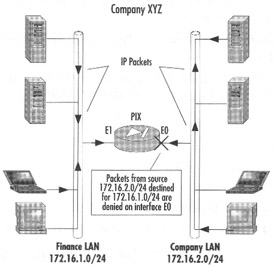
Due to security reasons, Company XYZ management has decided to restrict access to the Finance servers. Management has assigned the task of securing the Finance network from unauthorized access. Only individuals who are in the Finance departments network will have access to any of the Finance resources, any traffic originating from the Finance LAN will be permitted to any destination, and all other departments will not be permitted to access the Finance LAN. Figure 9.6 illustrates how the LAN will be set up.
pixfirewall(config)#write terminalnameif ethernet0 public security0nameif ethernet1 finance security100
Assign names and security values to each of the interfaces.
interface ethernet0 inside autointerface ethernet1 outside auto
Set each Ethernet interface to 10/100 auto negotiation.
ip address public 172.16.2.1 255.255.255.0ip address finance 172.16.1.1 255.255.255.0
Assign unique RFC1918 IP addresses to each of the interfaces.
access-list deny tcp any 172.16.1.0 255.255.255.0>eq anyaccess-list deny udp any 172.16.1.0 255.255.255.0>eq any
Specify that traffic originating from the 172.16.1.0/24 subnet will be denied.
access-group acl_out in interface public
Apply access-list acl_out to public interface.
telnet 172.16.1.0 255.255.255.0 publictelnet 172.16.2.0 255.255.255.0 finance
Specify that only clients from the 172.16.1.0/25 and 172.16.2.0/24 subnets will be able to Telnet to the PIX.
| Note | This configuration where two departments are separated for security reasons can easily be achieved by using a... |