Windows Forensic Analysis Toolkit

Alternative Methods of Analysis

There might be times when you re conducting a post-mortem computer forensic analysis (say, after you ve acquired an image) that you might need to perform analysis that is simply more cumbersome when you re working with an image. For example, you might decide that you want to scan the system for malware, such as Trojans, backdoors, or spyware. When you re working with an image of the system, you ve got what amounts to a single file (or, as is often the case, multiple files that add up to the size of the original hard drive), and you need a way to scan the files within the image. So, rather than pulling all the files out of the image, there are some tools that you can use to convert the image into a format suitable for scanning.

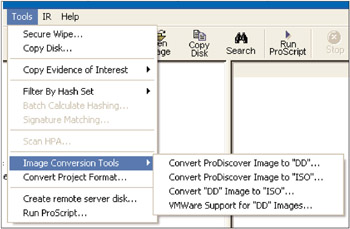
One such tool is available via ProDiscover. Beginning with version 4.85 of ProDiscover, the tool has the ability to either convert an image from the native ProDiscover format or the dd format to an ISO format. ProDiscover also has the ability to create files needed to boot the image in VMware. These new options are illustrated in Figure 5.14.


Figure 5.14: ProDiscover Menu Showing New Tools

As you can see in Figure 5.14, you can use ProDiscover to convert from the native ProDiscover .eve file format to dd format or from either a ProDiscover or dd image to an ISO 9660 Joliet specifications image. You can also use ProDiscover to...

UNLIMITED FREE
ACCESS
TO THE WORLD'S BEST IDEAS

SUBMIT
Already a GlobalSpec user? Log in.

This is embarrasing...

An error occurred while processing the form. Please try again in a few minutes.

Customize Your GlobalSpec Experience

Category: Anti-malware Software
Finish!
Privacy Policy

This is embarrasing...

An error occurred while processing the form. Please try again in a few minutes.