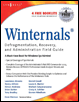
Winternals: Defragmentation, Recovery, and Administration Field Guide
Sometimes your antivirus and antispyware software does not catch everything and your computer starts to behave suspiciously, leaving you to believe that someone has compromised your computer. Using the standard tools that come with Windows can give you only an inkling of what may be happening, and learning more requires a more in-depth view of the problem. Additionally, finding information that is a bit more detailed or advanced is possible only if you are a system programmer or you have access to tools developed by a system programmer.
This chapter describes, in detail, the tools developed by Sysinternals to illustrate this sort of advanced information and explains how to use them. You will learn how to determine who has what kind of access to system resources, how to examine Encrypting File System (EFS) encrypted files, and how to verify the validity of suspicious local files. You will also learn how to use the available Winternals tools to move an unmovable file and to list files that are already marked to be moved. Finally, you will discover a simple way to check for rootkits on your system.
The notion of file- and folder-level security has been a part of the Windows operating system since its earliest days. In previous versions of the Windows operating system, Microsoft released separate, different versions for consumer and business use. Windows 95 and Windows 98 were intuitive and easy for consumers to use, but they offered no...