Basic MATLAB, Simulink, and Stateflow

This chapter introduces some of the graphics modeling capabilities of Simulink and Stateflow software. It shows the reader how to open, execute, and modify parameters within these models from the MATLAB Command Window and from MATLAB M-files.
Upon completion of this chapter, the reader will be able to identify graphics modeling capabilities of Simulink and Stateflow software, open and close Simulink and Stateflow models from the MATLAB Command Window, execute and simulate systems already implemented in Simulink and Stateflow software from the Command Window, and modify Simulink and Stateflow model parameters from MATLAB.
Simulink uses block diagrams to represent dynamic systems. Defining a system is much like drawing a block diagram. Blocks are copied from a library of blocks.
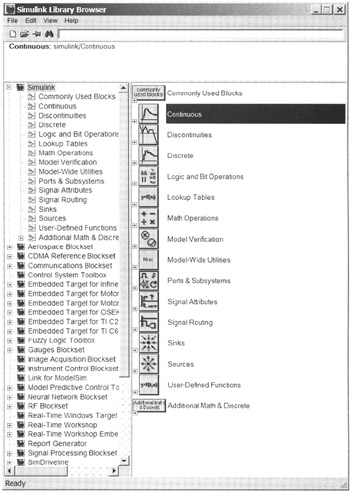
Typing the command simulink opens the standard block library. The standard block library is divided into several subsystems, grouping blocks according to their behavior (see Fig. 7.1).
Examples using the standard block libraries provided with Simulink are shown next. They include sources (which generate input signals), sinks (places where output data can be stored), linear blocks, nonlinear blocks, discrete blocks, and connections. The user...