BeOS: Porting UNIX Applications
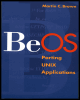
A how-to book for programmers porting applications to BeOS -- as well as those writing new apps for BeOS.
 TABLE OF CONTENTS
 We made it! Once you have finally built the software and it's working, it's time to let the rest of the world know about it. Before you announce your software, you need to prepare the package you're going to supply to the public.
There is nothing more frustrating than spending hours downloading a package, unpacking it, typing make, and finding out it doesn't work after all because the developer/porter forgot to supply some vital component. Not only do you need to test the software once you've compiled it, but you also need to test the package you are going to supply, from the point of unpacking all the way up to installation. This is not as easy as it sounds your machine will undoubtedly be different from everybody else's but you can minimize the effects of these differences.
First, make a complete copy of the working directory. Try to keep the file permissions and directory layout. You can use the cp command for this,
$ cp -pr gawk-3.0.2 begawk-3.0.2
but I prefer to use tar, which tends to work better with multiple directories:
$ mkdir begawk-3.0.2 $ cd begawk-3.0.2 $ (cd ../gawk-3.0.2;tar cf -)tar xvf -
Within the new directory run a make clean, or the equivalent command, to return the distribution to a base level. If you don't have access to a clean operation, make sure you remove any temporary editor...