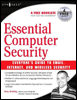
Essential Computer Security: Everyone’s Guide to E-Mail, Internet, and Wireless Security
Part I: Bare Essentials

In This Part:

Chapter 1: Basic Windows Security
Chapter 2: Passwords
Chapter 3: Viruses, Worms, and Other Malware
Chapter 4: Patching

Introduction

The majority of home computers use some version of Microsoft Windows as the operating system. Most of those users, either by purchasing a new computer system in the past couple of years or by upgrading, rely on a version of Windows XP.

Before we go on to the rest of this book and explore how to use different applications securely, such as Web browsers or e-mail clients, you need to understand the fundamental security of the operating system itself.This chapter will explain the following:

  • Basic risks of computer use

  • Accessing Windows

  • User accounts and Security Groups

  • File and folder security

  • Protecting Windows services

  • Dangers of hidden file extensions

  • Screen savers as security tools

Why Do You Need to Be Secure?

Do you want your computer to be absolutely, positively, 100-percent secure against all vulnerabilities and exploits, not only those known now, but those yet to be discovered? It s simple: leave your computer in the box, because once you turn the computer on, you begin to walk a tightrope between functionality (or convenience) and security. Unfortunately, many of the features that make your computer easier to use also create various security issues as well.

Some people appreciate that their printer is able to communicate with the computer and alert them with messages when the...

UNLIMITED FREE
ACCESS
TO THE WORLD'S BEST IDEAS

SUBMIT
Already a GlobalSpec user? Log in.

This is embarrasing...

An error occurred while processing the form. Please try again in a few minutes.

Customize Your GlobalSpec Experience

Category: Anti-malware Software
Finish!
Privacy Policy

This is embarrasing...

An error occurred while processing the form. Please try again in a few minutes.