LabVIEW based Advanced Instrumentation Systems
11.3: Using the Timed Loop to Write Multirate Applications in LabVIEW

11.3 Using the Timed Loop to Write Multirate Applications in LabVIEW

This application describes the features of the Timed Loop and the method to use the Timed Loop to develop multi rate applications. The user can use the Timed Loop on Windows 2000/XP, PharLap ETS, and LabVIEW Real-Time Module on MacOS 10.x targeted to a supported real-time device.

11.3.1 Timed Loops

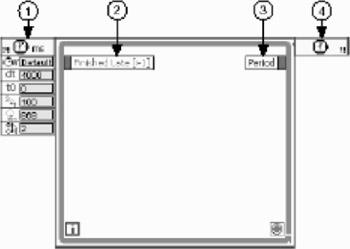
A Timed Loop executes an iteration of the loop at the period specified by the user. The Timed Loop is used when the user wants to develop Vis with multirate timing capabilities, precise timing, feedback on loop execution, timing characteristics that change dynamically, or several levels of execution priority. The Vis and functions used on the Timed Loop and the DAQmx palettes with the Timed Loop to develop Vis that control timing sources. The Timed Loop includes the ( 1) Input, ( 2) Left Data, ( 3) Right Data, and ( 4) Output nodes, as shown in the following illustration in Fig. 11.18.


Fig. 11.18: Timed Loop

The user can set configuration options of the Timed Loop by wiring values to the inputs of the Input Node, or using the Loop Configuration dialog box to enter values for the options. By default, the inputs of the Input Node appear as icons with the values specified in the Loop Configuration dialog box.

The Left Data Node of the Timed Loop provides timing and status information about the previous loop iteration, such as...

UNLIMITED FREE
ACCESS
TO THE WORLD'S BEST IDEAS

SUBMIT
Already a GlobalSpec user? Log in.

This is embarrasing...

An error occurred while processing the form. Please try again in a few minutes.

Customize Your GlobalSpec Experience

Category: Loop Powered Devices
Finish!
Privacy Policy

This is embarrasing...

An error occurred while processing the form. Please try again in a few minutes.