MATLAB Guide

Chapter 17: Handle Graphics

The graphics functions described in Chapter 8 can produce a wide range of output and are sufficient to satisfy the needs of many MATLAB users. These functions are part of an object-oriented graphics system known as Handle Graphics that provides full control over the way MATLAB displays data. A knowledge of Handle Graphics is useful if you want to fine-tune the appearance of your plots, and it enables you to produce displays that are not possible with the existing functions. This chapter provides a brief introduction to Handle Graphics. More information can be found in [57].

17.1 Objects and Properties

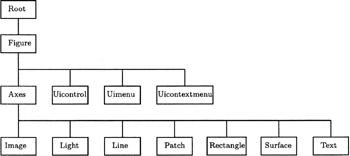
Handle Graphics builds graphs out of objects organized in a hierarchy, as shown in Figure 17.1. The Root object corresponds to the whole screen and a Figure object to a figure window. Of the objects on the third level of the tree we will be concerned only with the Axes object, which is a region of the figure window in which objects from the bottom level of the tree are displayed. A figure window may contain more than one Axes object, as we will see in an example below. From the bottom level of the tree we will be concerned only with the Line, Surface and Text objects.


Figure 17.1: Hierarchical structure of Handle Graphics objects.

Each object has a unique identifier called a handle, which is a floating point number (sometimes an integer). The handle of the Root object is always 0. The handle of a Figure object is,...

UNLIMITED FREE
ACCESS
TO THE WORLD'S BEST IDEAS

SUBMIT
Already a GlobalSpec user? Log in.

This is embarrasing...

An error occurred while processing the form. Please try again in a few minutes.

Customize Your GlobalSpec Experience

Category: LiDAR Sensors
Finish!
Privacy Policy

This is embarrasing...

An error occurred while processing the form. Please try again in a few minutes.