The Student's Introduction to MATHEMATICA: A Handbook for Precalculus, Calculus, and Linear Algebra

3.4: Investigating Functions with Manipulate

3.4 Investigating Functions with Manipulate

The Manipulate command is used to manipulate an expression in real time using the mouse (or even a gamepad controller; see Exercise 7). One of the most basic uses of Manipulate is to evaluate a function defined over an interval, say 1 ? x ? 10. In such a case, the syntax is identical to that of the Plot command:

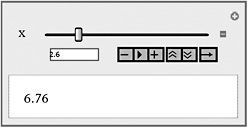
  In[1]:= <b class="bold">Manipulate[x</b><sup<b class="bold">2</b></sup><b class="bold">,</b> <b class="bold">{x, 1, 10}]</b><span class="inlinemediaobject"><a NAME="IMG_139"> href="portalcontent.asp?bkid=31099&image_src=https://images.books24x7.com/bookimages/id_31099/fig88%5F01%5F0%2Ejpg&image_id=139&previd=IMG_139"> target="_parent"><img alt="Image from book"> border="0"> height="108"> id="IMG_139"> src="https://images.books24x7.com/bookimages/id_31099/fig88_01.jpg"> title="Click To expand"> width="296"></a></span>

The controller, aptly called a manipulator, initially displays as a slider. Clicking on the button to the right of the slider, however, will reveal additional controls beneath:

Now operate the slider. It ranges over the values from 1 to 10 in this example, and the current value is displayed in the input field directly under the slider. The function value f( x) = x 2 is displayed below. Try it. As you position your mouse over any control button, a tooltip will appear that describes that button s function. For instance, the Play/Pause button is used to start and stop an animation, while the buttons on either side of it will advance it forward or backward one frame at a time. The double up and down arrow buttons are used to adjust the speed of the animation, and the direction button on the far right is used to determine whether...

UNLIMITED FREE
ACCESS
TO THE WORLD'S BEST IDEAS

SUBMIT
Already a GlobalSpec user? Log in.

This is embarrasing...

An error occurred while processing the form. Please try again in a few minutes.

Customize Your GlobalSpec Experience

Category: Inertial Sensor Chips
Finish!
Privacy Policy

This is embarrasing...

An error occurred while processing the form. Please try again in a few minutes.