The Student's Introduction to MATHEMATICA: A Handbook for Precalculus, Calculus, and Linear Algebra

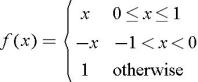
Certain functions are defined by different rules over various disjoint pieces of their domain, so-called piecewise defined functions. For instance a function may be defined by the rule f( x) = x when x is between zero and one, inclusive; by the rule f( x) = ? x when x is strictly between negative one and zero; and by f( x) = 1 for all other values of x. In standard mathematical notation we write:
Here otherwise means that either x > 1 or x ? ?1. How can this be conveyed to Mathematica? It is a simple matter to enter a piecewise function directly from the keyboard in standard notation. To do so, first type f[x_]:=, then create the single bracket by typing
, and finally produce a grid to the right of the bracket by typing
. If more than two rows are needed, type
. Each time you hit
you will add one additional row. Now move the cursor to the first placeholder and type in a function expression, then use the
key to move to the adjacent placeholder and type a logical expression. This is typically an inequality such as 0 ? x ? 1, but in all cases is an expression that evaluates to either True or False when x is a specific real number. Fill in the remaining...