Ethereal Packet Sniffing
This book provides insider information on how to optimize performance of Ethereal on enterprise networks, and shows how Ethereal compiles and runs on many flavors of UNIX and Windows.
 TABLE OF CONTENTS
 The Filter Bar (Figure 4.6) allows you to enter a filter string restricting which packets are displayed in the Summary Window. Only packets that match the display filter string will be displayed in the Summary Window. A display filter string is a string defining some conditions on a packet that may or may not match a packet. For example, the display filter string (ip.addr == 10.15.162.1 && bgp) would match all packets with an IP address (source or destination) of 10.15.162.1 that are BGP protocol packets. Filtering will be explored in much greater depth in Chapter 5, but we will examine the basic functions of the Filter Bar briefly here.
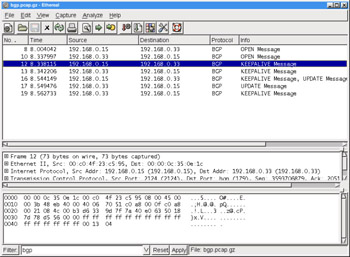
You can see in Figure 4.6 that we have applied a bgp filter. To apply a filter, enter the desired string into the Filter: text field and press Enter (or click the Apply button). Please note that your filter string will not be applied until you hit Enter or click the Apply button . In addition, note that filter strings are case-sensitive and the filter string BGP (uppercase) will not work. Traditionally, filter string labels like bgp are entirely in lowercase.
Once the display filter string bgp is applied, you will note that only BGP packets are displayed in the Summary Window. You should also note that the No. column displays jumps between the frame numbers of the displayed packets. This...