Ethereal Packet Sniffing

This book provides insider information on how to optimize performance of Ethereal on enterprise networks, and shows how Ethereal compiles and runs on many flavors of UNIX and Windows.
 TABLE OF CONTENTS
 It is important for us to define a common set of labels for the different components of the Main Window so that we can speak clearly about them. Figure 4.1 shows the Main Window of Ethereal with its major components labeled.
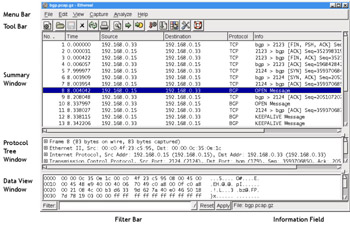
The Main Window components are described in Table 4.1:
| Window Component | Description |
|---|---|
| Menu Bar | A typical application menu bar containing drop-down menu items. |
| Tool Bar | A toolbar containing buttons for some commonly used functions of Ethereal. The Tool Bar icons have tool tips that are displayed when you pause the mouse pointer over them. |
| Summary Window | A window providing a one-line summary for each packet in the capture. |
| Protocol Tree Window | A window providing a detailed decode of the packet selected in the Summary Window. |
| Data View Window | A window providing a view of the raw data in the packet selected in the Summary Window. |
| Filter Bar | A tool for applying filters to the Summary Window to restrict which packets in the capture are displayed, based upon their attributes. |
| Information Field | A small display area to provide information about the capture or field selected in the Protocol Tree Window. |
The Summary Window displays a summary of each packet in the capture, one per line. One or more columns of summary data for each packet will be displayed. Typical columns are shown in Table 4.2.
| Column Name | Description |
|---|