Ethereal Packet Sniffing

This book provides insider information on how to optimize performance of Ethereal on enterprise networks, and shows how Ethereal compiles and runs on many flavors of UNIX and Windows.
 TABLE OF CONTENTS
 All of the functionality available within Ethereal is accessible from the Menu Bar. In this section we will systematically explore that functionality and provide examples of its use.
The File menu provides access to loading, saving and printing capture files, as seen in Figure 4.8. File menu options are defined in Table 4.5.
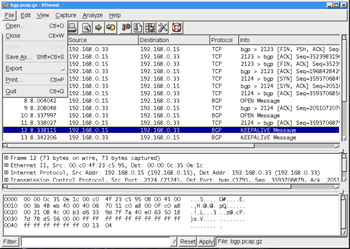
| Menu Option | Description |
|---|---|
| Open | Open a capture file. |
| Close | Close the current capture file. |
| Save | Save the current capture file. |
| Save As | Save the current capture file with a different filename/format. |
| Export | Display the Export submenu allowing the portion of the packet highlighted in the Data View Window to be exported as a hexadecimal dump. |
| | Print the current capture file. |
| Quit | Quit the Ethereal application. |
To open a file (Figure 4.9) , select File Open.
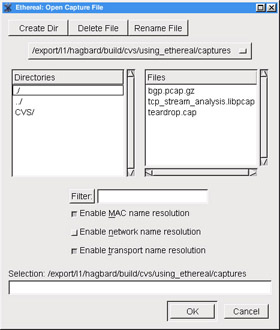
The Open dialog box provides normal mechanisms for navigation in selecting a file. Additionally, it provides a Filter: field where an Ethereal display filter string can be entered to filter which packets are read from the capture file. Clicking the Filter: button will open the Display Filter dialog box. The Display Filter dialog box is described in the section entitled Analyze .
The Open dialog box also has checkboxes to enable name resolution for MAC addresses, network names, and transport names. To open a file, browse to the correct location and select the desired file, optionally...