Automating FileMaker Pro: Scripting, Calculations, and Data Transfer
Everything you ever wanted to know about scripting, calculations, and data transfer.
 TABLE OF CONTENTS
 ScriptMaker is FileMaker Pro's script authoring system. This chapter shows you how it works and gives you an introduction to creating and editing scripts. It also provides the conceptual framework of FileMaker Pro scripts, which are based on individual commands known as steps.
The ScriptMaker tool is part of FileMaker Pro. It is the first item in the Scripts menu. When you choose ScriptMaker, the script definition window shown in Figure 2-1 opens.
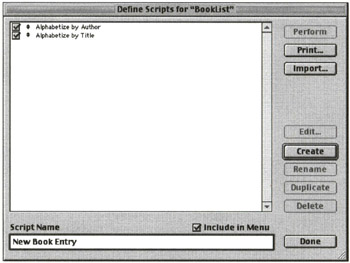
This window lets you manage all of the scripts associated with a database. Its operations fall into four general categories:
Scripts are parts of databases; they are stored only within a database to which they refer. You can create scripts in three ways: by using the Create button on the Script Definition window, by duplicating an existing script, or by importing scripts from another database.
To create a script, type its name in the Script Name field at the bottom of the window and then click Create. Unlike a file in a word processing program, a script is named before you enter any data into it.
Highlight a script in the list of scripts in the Script Definition window and click the Duplicate button to make a copy. Typically, you then immediately rename the script and make a few changes in it to customize it.
Starting in FileMaker Pro 5.0, you can import scripts from other...








