Check Point NG VPN-1/FireWall-1: Advanced Configuration and Troubleshooting

Nokia IPSO Clustering

ClusterXL is not available for the Nokia platform. This is because Nokia provides its own HA and load-sharing solutions. In this section, we look at the load-sharing cluster solution that Nokia provides on IPSO 3.6-FCS4, how to configure it, and how to configure FireWall-1 NG FP3 so that you have a complete Nokia load-sharing solution. We then talk about how you can test the cluster and go over any special considerations for this solution.

Nokia Configuration

To configure a Nokia load-sharing cluster, you need to take the following steps:

  1. Configure the interfaces of a Nokia.

  2. Configure FireWall-1.

  3. Configure clustering in Voyager.

We assume that you have installed the latest version of IPSO 3.6 on your Nokia and that you have the Check Point FireWall-1 NG FP3 package installed and configured. As with setting up all clusters, it is recommended that you complete and test the physical connectivity first so that any problems that you encounter later aren t due to a misconfigured switch or interface, because these could be difficult to spot later.

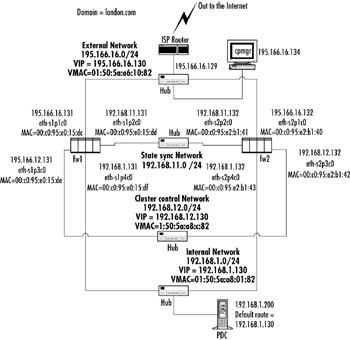
In our example shown in Figure 6.51, you can see a sample Nokia cluster topology.


Figure 6.51: Our Example Nokia Clustering Topology Setup

The main difference in network topology between Nokia clustering and using Check Point ClusterXL is that you require a dedicated network for Nokia cluster control communications. This is in addition to the Check Point state sync network.

As you can see from Figure 6.51, each network that has a VIP also...

UNLIMITED FREE
ACCESS
TO THE WORLD'S BEST IDEAS

SUBMIT
Already a GlobalSpec user? Log in.

This is embarrasing...

An error occurred while processing the form. Please try again in a few minutes.

Customize Your GlobalSpec Experience

Category: Cluster Software and Tools
Finish!
Privacy Policy

This is embarrasing...

An error occurred while processing the form. Please try again in a few minutes.