Programming the PIC Microcontroller with MBasic

Bar Code Wand

How then do we get black and white bars on paper into a PIC? We'll use the simplest possible scanner, a bar code wand reader. To read you swipe the wand across the bar code. There's a lot of black magic that goes into a wand, so I'll assume you will use an already build commercial wand. I recently purchased two unused Hewlett Packard A000-series wands for $5.00 each from an electronics surplus house and similar wands from HP and other manufacturers are widely available in the surplus market.


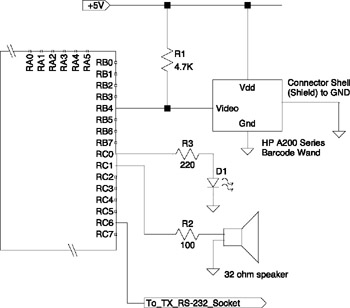
Figure 25-5: Scanning wand connection.

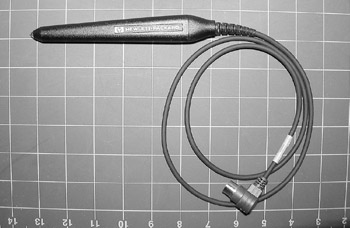
My HP wand is shown in Figure 25-4. It came with a three-foot cable terminated with a 6-pin DIN plug. (The mating panel jack is a Mouser Electronics part no. 16PJ224.) Although I was able to find HP's data sheet [25-4] for the A000-series wands, my DIN plug had six pins, not five as the data sheet shows. Since you may have a similar problem, I'll go though how I identified the correct pin connection.


Figure 25-4: Bar code scanning wand.

Many wands of this era used HP's specialized LED sensor and support chip, HBCC-0500 and followed HP's recommended circuit design shown in the associated data sheet. [25-3] The wand has three connections; +5V (red), ground (black) and an open collector output (white). A fourth connection is the shield for the cable, which is normally connected to the DIN plug's shell. The wiring color code comes from HP's data sheet. Using...

UNLIMITED FREE
ACCESS
TO THE WORLD'S BEST IDEAS

SUBMIT
Already a GlobalSpec user? Log in.

This is embarrasing...

An error occurred while processing the form. Please try again in a few minutes.

Customize Your GlobalSpec Experience

Category: Barcode Scanners
Finish!
Privacy Policy

This is embarrasing...

An error occurred while processing the form. Please try again in a few minutes.